
How Models Are Packaged: pickle vs safetensors vs GGUF
The same numbers, three very different files — and why one of them could once run code on your machine.
 Saif Bagmaru//6 min read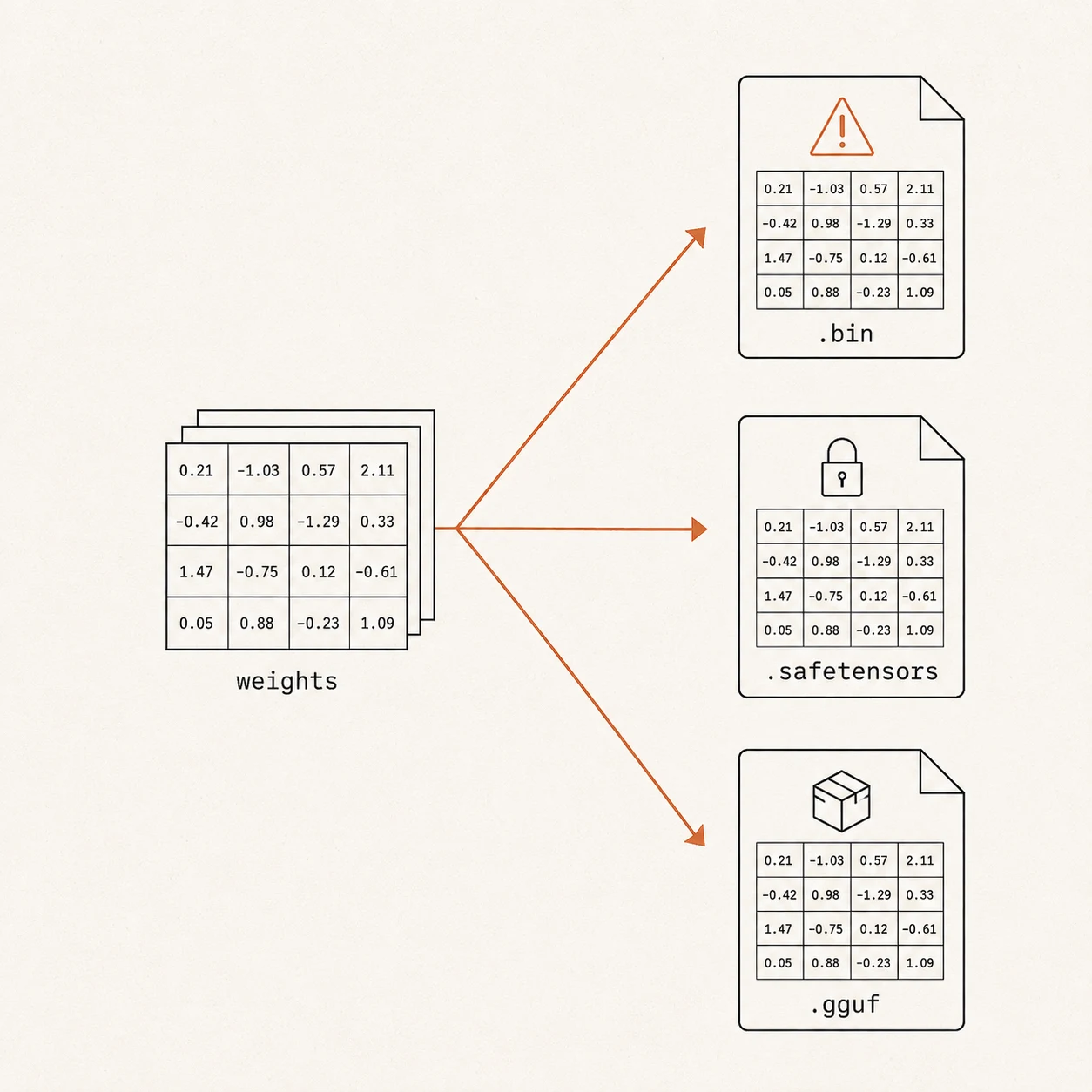
In the last post, we established that a model is just a large collection of tensors — named grids of numbers. But those numbers have to be written into an actual file on disk, and there’s more than one way to do that.
The format you choose affects three things that matter: is it safe to load, what else ships alongside the weights, and how fast it loads.
Three formats dominate the open-source world today. Let’s go through them in the order they appeared — because the story is really about fixing the problems of the one before.
1. Pickle (.bin, .pt) — the original, and the dangerous one
The earliest PyTorch models were saved using Python’s built-in pickle system. Pickle’s job is to take a Python object — in this case the model’s dictionary of tensors — and write it to disk so it can be rebuilt later.
It works. But it has a serious flaw that has nothing to do with machine learning.
A pickle file can contain executable code that runs the instant you load it.
That’s not a bug; it’s how pickle was designed. When Python “unpickles” a file, it’s allowed to reconstruct arbitrary objects, and that process can be hijacked to run any command — delete files, open a network connection, install something. In practice, this meant that simply downloading a model from the internet and loading it could run whatever the file’s author wanted on your machine.
This wasn’t theoretical. Real malicious model files were caught in the wild, which is exactly why the community moved on.
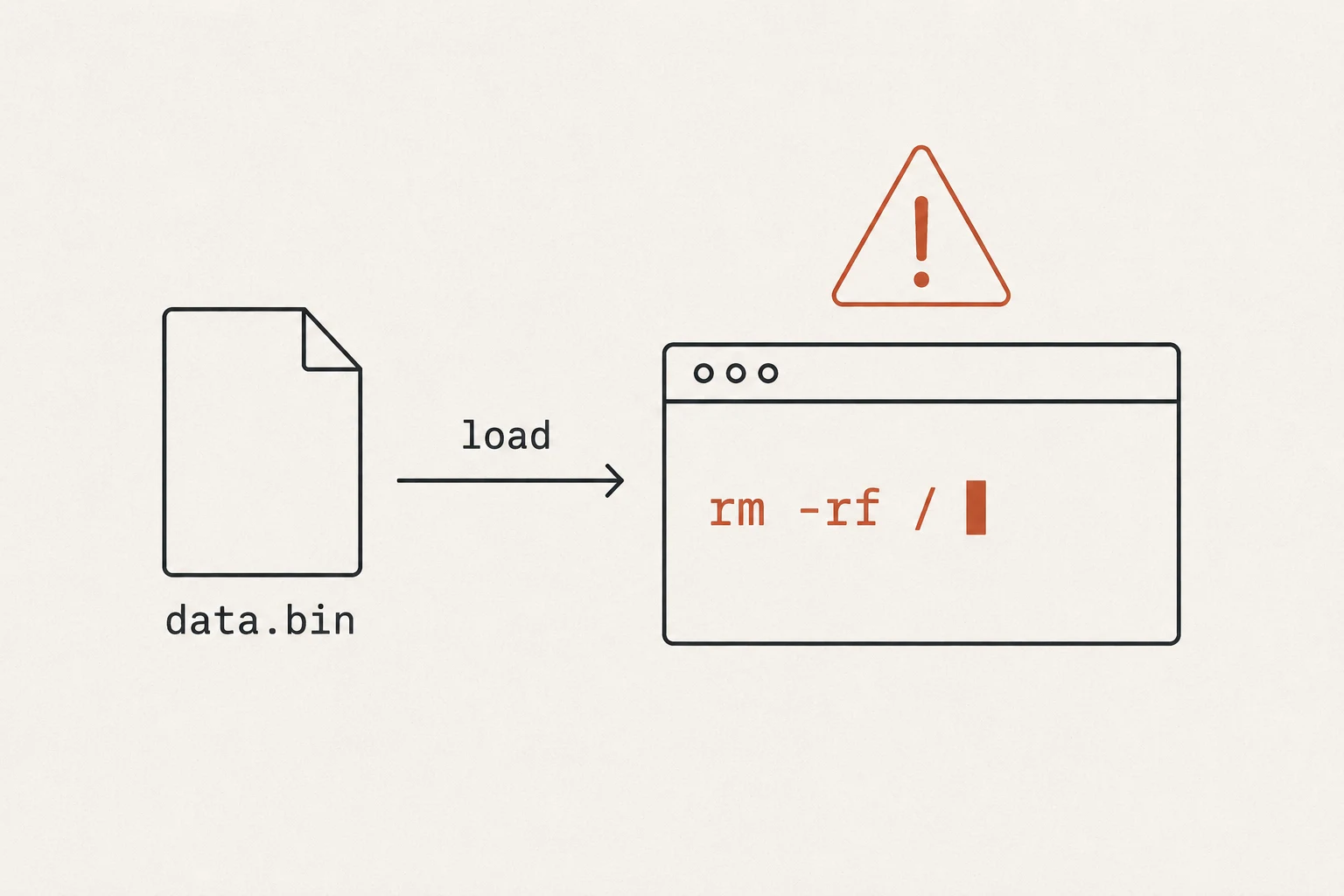
You’ll still find .bin and .pt files on older models, and they’re fine inside your own trusted environment — your own training checkpoints, for example. But for anything you download from strangers on the internet, the ecosystem now strongly prefers the next format.
2. Safetensors — the safe, fast, modern default
safetensors was created by Hugging Face specifically to solve pickle’s problem. Its design is deliberately boring, and that’s the entire point.
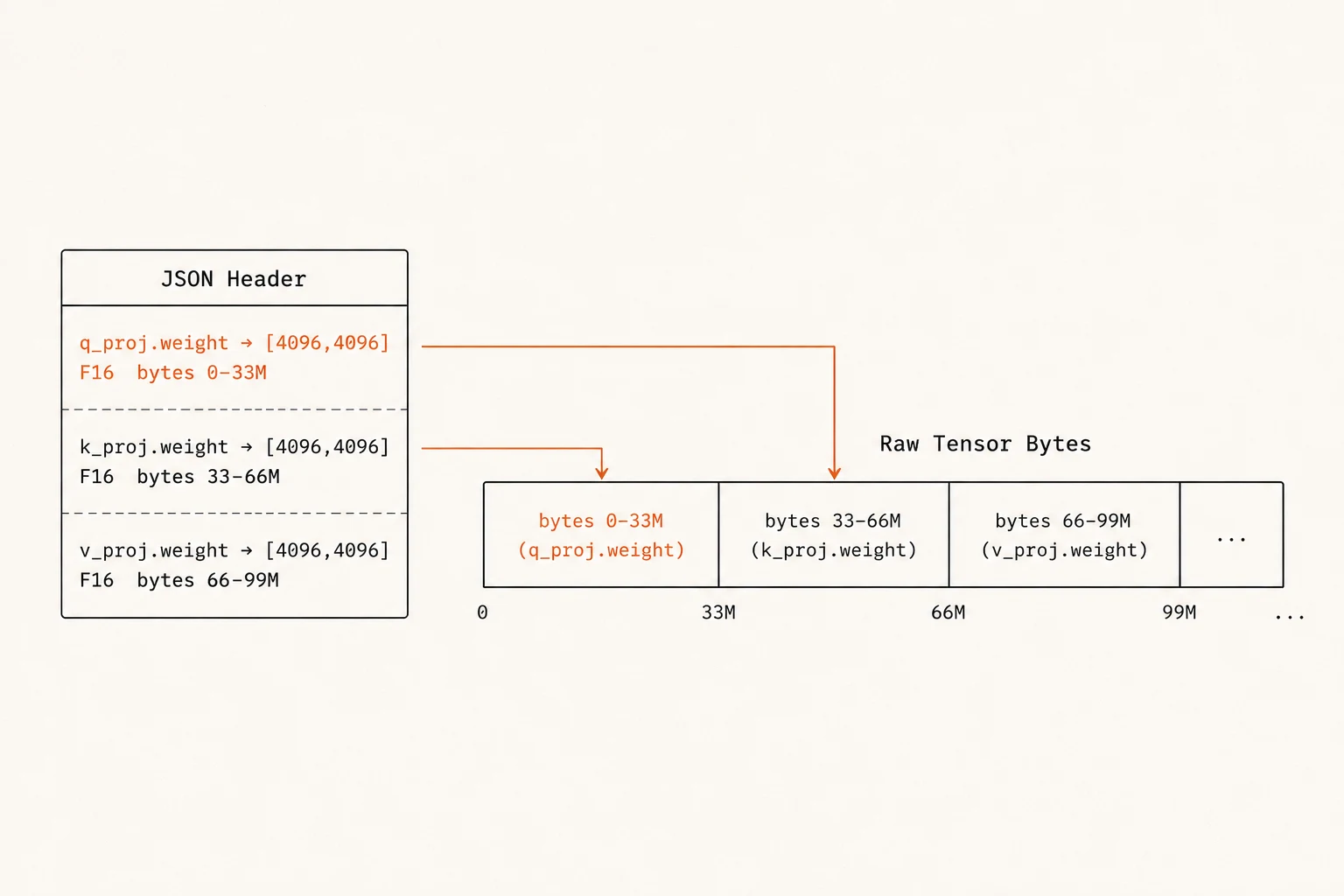
A safetensors file has just two parts:
- A small JSON header at the front, listing every tensor’s name, shape, data type, and the exact byte range where its data lives.
- The raw tensor bytes, stored one after another in a single contiguous block.
That’s it. There is no place to hide code, and nothing executes when you load it. The worst a malicious safetensors file can do is describe its tensors incorrectly — it can’t touch your system. Loading the file does exactly one thing: it fills memory with numbers.
Safetensors is now the standard format on the Hugging Face Hub and the one you’ll download most often. Its simple layout also happens to make loading extremely fast — but why that is depends on how memory loading works, so we’re saving that explanation for the next post, where it’ll actually make sense.
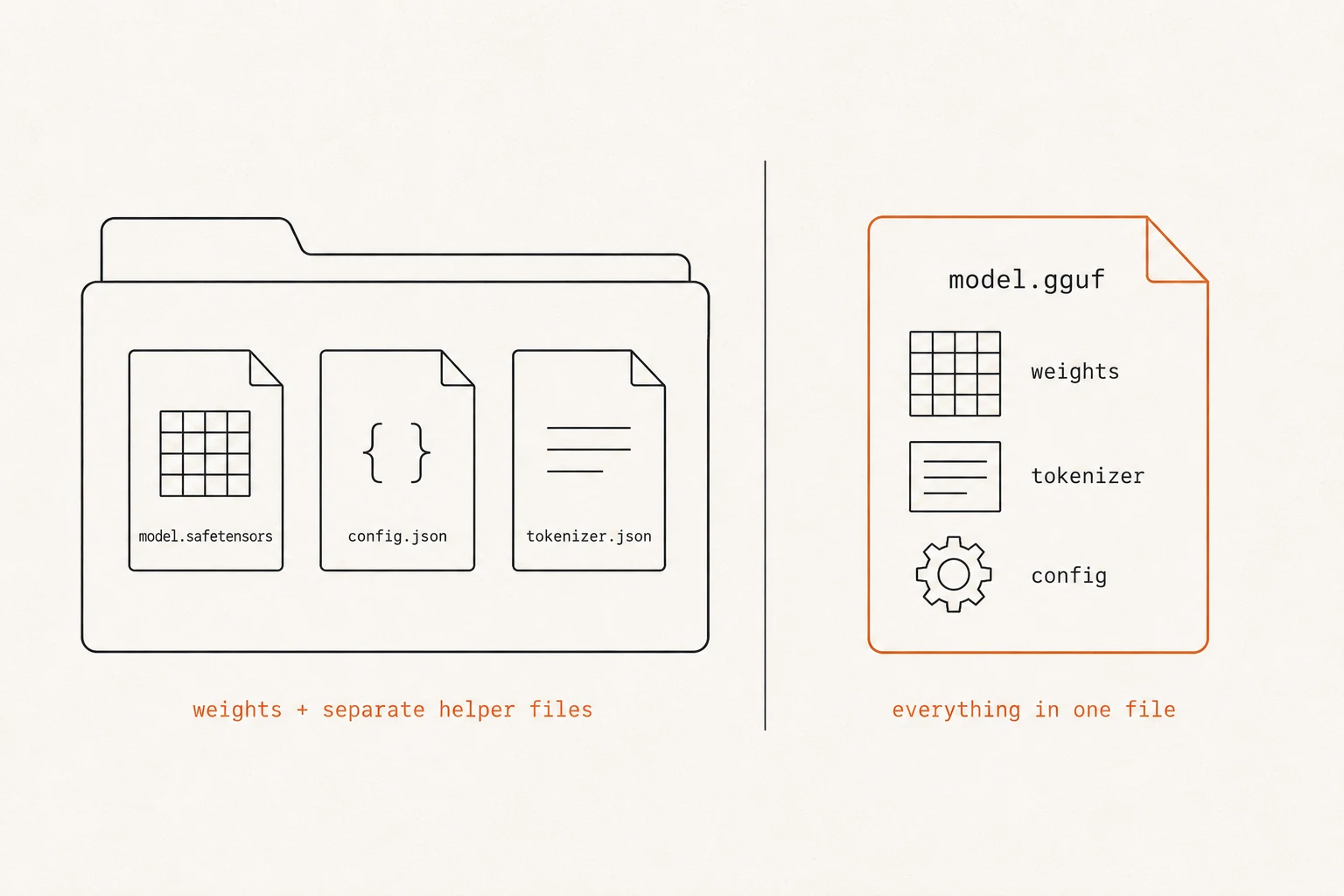
One thing safetensors does not do: it stores only the tensors. The other things a model needs to run — the tokenizer, the configuration, the architecture details — ship as separate files alongside it. Which brings us to a format that takes the opposite approach.
3. GGUF — everything in one self-contained file
GGUF (GGML Universal File) comes from the llama.cpp project, created by Georgi Gerganov as the successor to the earlier GGML format. It’s the format you’ll encounter whenever you run a model locally with tools like llama.cpp, Ollama, or LM Studio.
GGUF’s defining trait is that it’s self-contained. Where safetensors gives you just the weights and leaves the rest as separate files, a single GGUF file bundles everything needed to run the model:
- the tensors (the weights),
- the tokenizer,
- the model’s architecture and settings (context length, and so on),
- and other metadata.
One file, and you can run the model. No hunting for matching config or tokenizer files. GGUF files are also usually quantized — that’s where those names like Q4_K_M come from — which is what makes them small enough to run comfortably on a laptop.
What a GGUF file looks like inside
Because GGUF is so common for local models, it’s worth seeing its structure once. A GGUF file has four sections, in order:
- Header — starts with the “magic number”
GGUF(four bytes that let any tool instantly recognize the file) and a version number. - Metadata — a key–value list describing the model: architecture, context length, tokenizer, and other settings. This is the part that makes GGUF self-contained.
- Tensor info — a directory listing every tensor’s name, shape, type, and byte offset (where its data begins).
- Tensor data — the actual numbers, stored as one large aligned block.
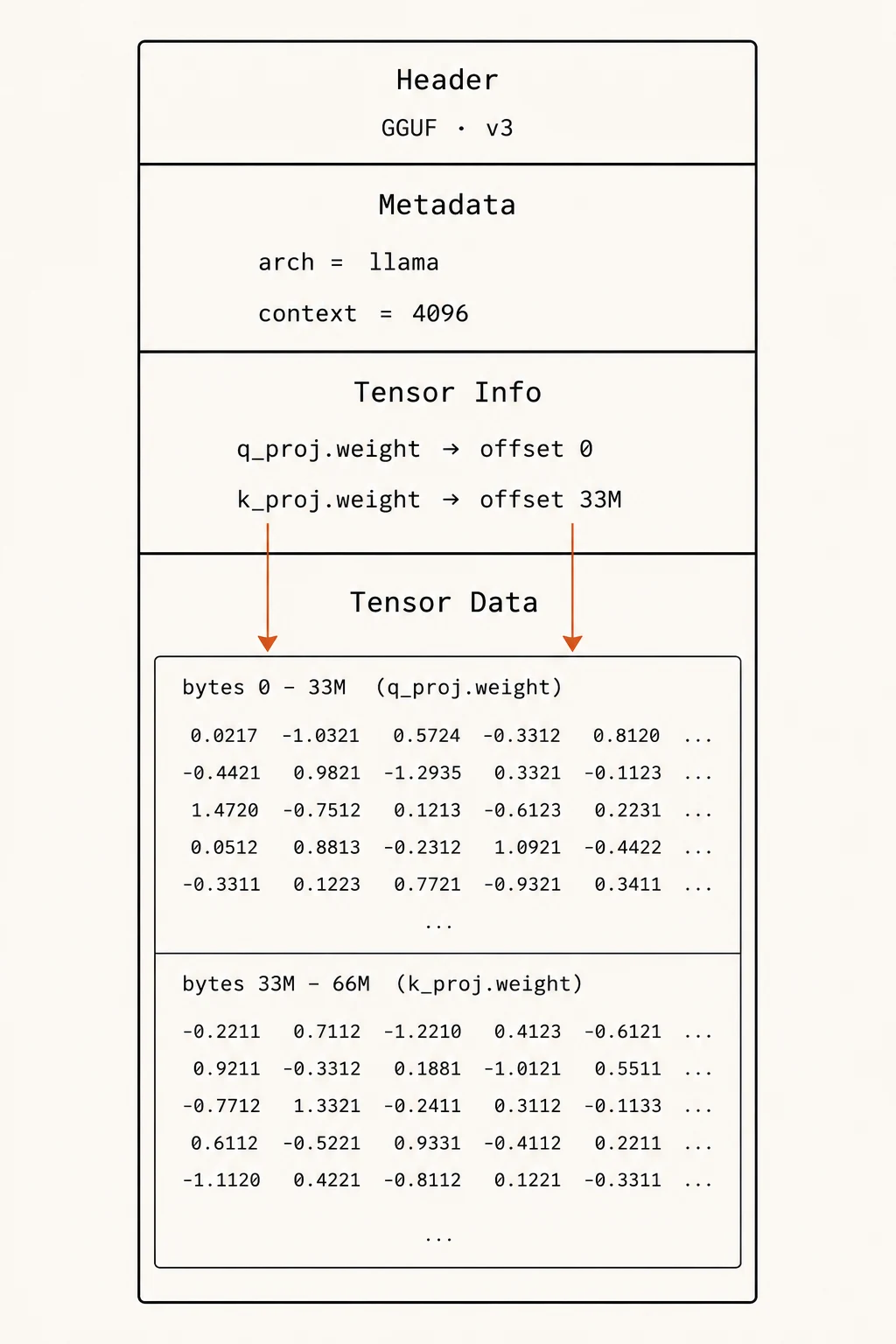
That byte offset idea — each tensor recording exactly where its data starts — shows up in both safetensors and GGUF, and it’s not a throwaway detail. It’s the key that makes fast loading possible, and it’s exactly where the next post begins.
Big models come in pieces
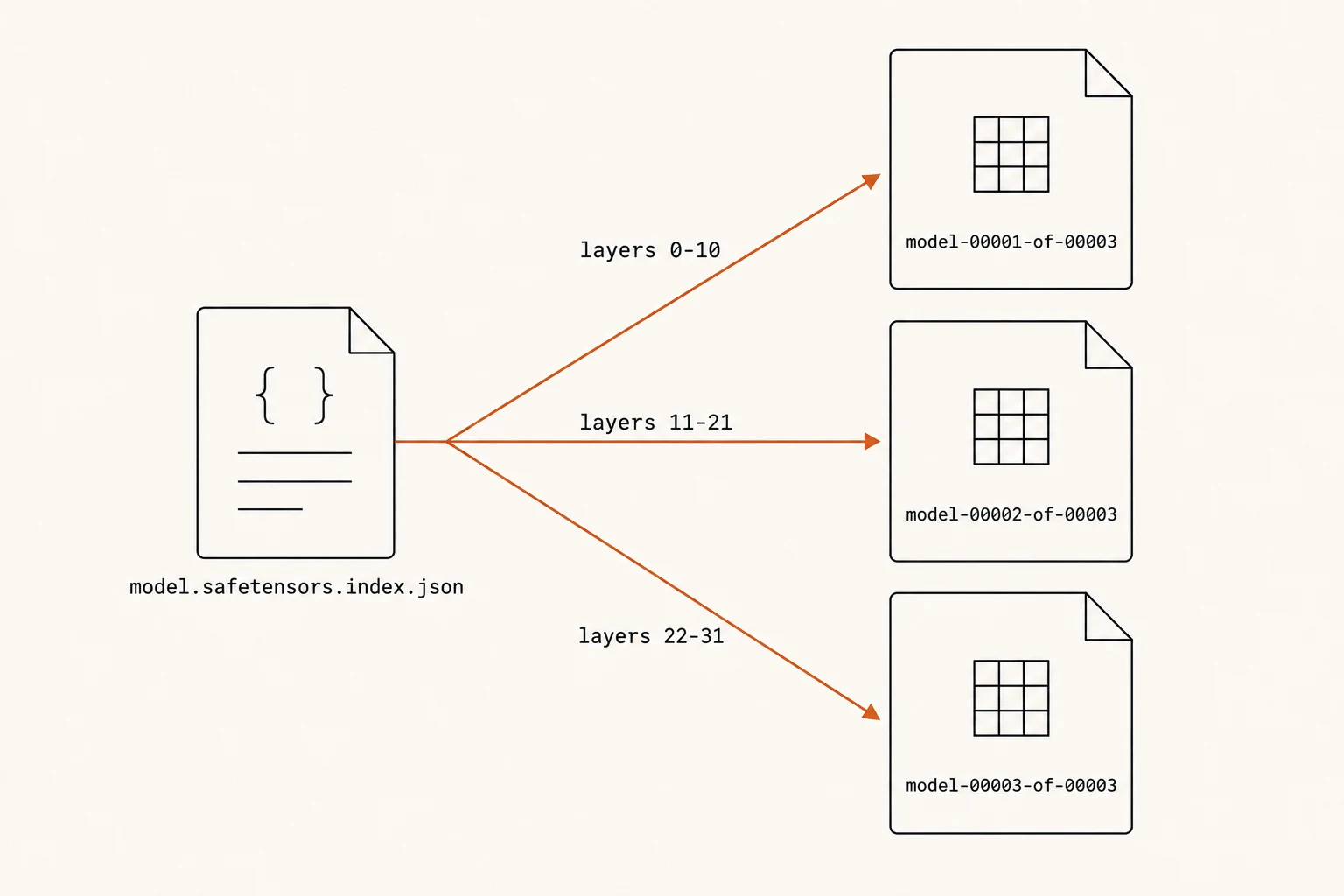
One more practical thing you’ll notice: you often download not one file but several, named like model-00001-of-00003.safetensors.
This is just file-size management. A very large model’s tensors are split (“sharded”) across multiple files, with an index file (model.safetensors.index.json) that records which tensor lives in which file. When the model loads, the loader reads the index first and reassembles everything into the complete set of tensors. Nothing conceptually new — it’s the same collection of numbers, just spread across a few files so no single file becomes unwieldy.
Which format should you actually use?
A quick, practical summary:
- Downloading a model to run or fine-tune with PyTorch / Transformers → Use safetensors — safe, fast, the Hub standard.
- Running locally on a laptop or modest hardware (llama.cpp, Ollama, LM Studio) → Use GGUF — self-contained and quantized to fit.
- Handed a .bin or .pt file from an untrusted source → Be cautious — prefer safetensors if one exists; only load pickle you trust.
The numbers inside are identical in every case. The format is just about safety, convenience, and speed — not about the model’s intelligence.
TL;DR
- The same tensors can be packed into different file formats. The format affects safety, what ships with the weights, and load speed — not the model itself.
- Pickle (
.bin,.pt) — the original PyTorch format. Can execute hidden code on load, a real security risk. Fine for your own trusted files; avoid from untrusted sources. - Safetensors — the modern default: just a JSON header plus raw bytes, so nothing can execute. Safe, fast, the Hugging Face standard. Stores only the weights — tokenizer and config ship separately.
- GGUF — a self-contained single file (weights + tokenizer + config + metadata), usually quantized, built for local inference with llama.cpp / Ollama / LM Studio. Four sections: header, metadata, tensor info, tensor data.
- Large models are sharded across several files with an index that maps tensors to files.
- Both safetensors and GGUF record each tensor’s byte offset — the detail that makes fast loading possible.
Enjoyed this? Subscribe on the homepage to catch the next post.
Loading comments…
0 comments