
From Disk to Memory: How a Model's Weights Actually Get Loaded
The SSD → RAM → VRAM journey — and why loading can be nearly instant.
 Saif Bagmaru//7 min read
Over the last three posts we’ve built up a clear picture of the static model: a GPU is built for bulk parallel math, a model is a big collection of tensors, and those tensors get packed into a file format like safetensors or GGUF.
Nothing has moved yet. In this post, the model finally makes its journey — from a file sitting on disk to numbers the GPU can compute on.
And there’s a genuine puzzle to solve. A modern model is many gigabytes. Yet when you start it up (especially the second time), it can be ready in a second or two. If “loading” meant reading every byte off the disk and copying it into memory, that would take far longer.
The resolution of that puzzle is the whole point of this post.
First, the three places data can live
To understand the journey, you need to know the three types of memory involved. They differ along three axes: how much they hold, how fast they are, and how much they cost.
- SSD (the disk) — where the model file permanently lives. Huge capacity and cheap, but the slowest of the three. This is storage: it keeps your data even when the power is off.
- System RAM (CPU memory, DRAM) — the computer’s working memory. Smaller than the disk, but much faster. This is temporary: it’s cleared when you shut down.
- GPU VRAM (also called HBM) — the GPU’s own private memory, sitting right next to its cores. It’s the fastest by far, but also the smallest and most expensive of the three.
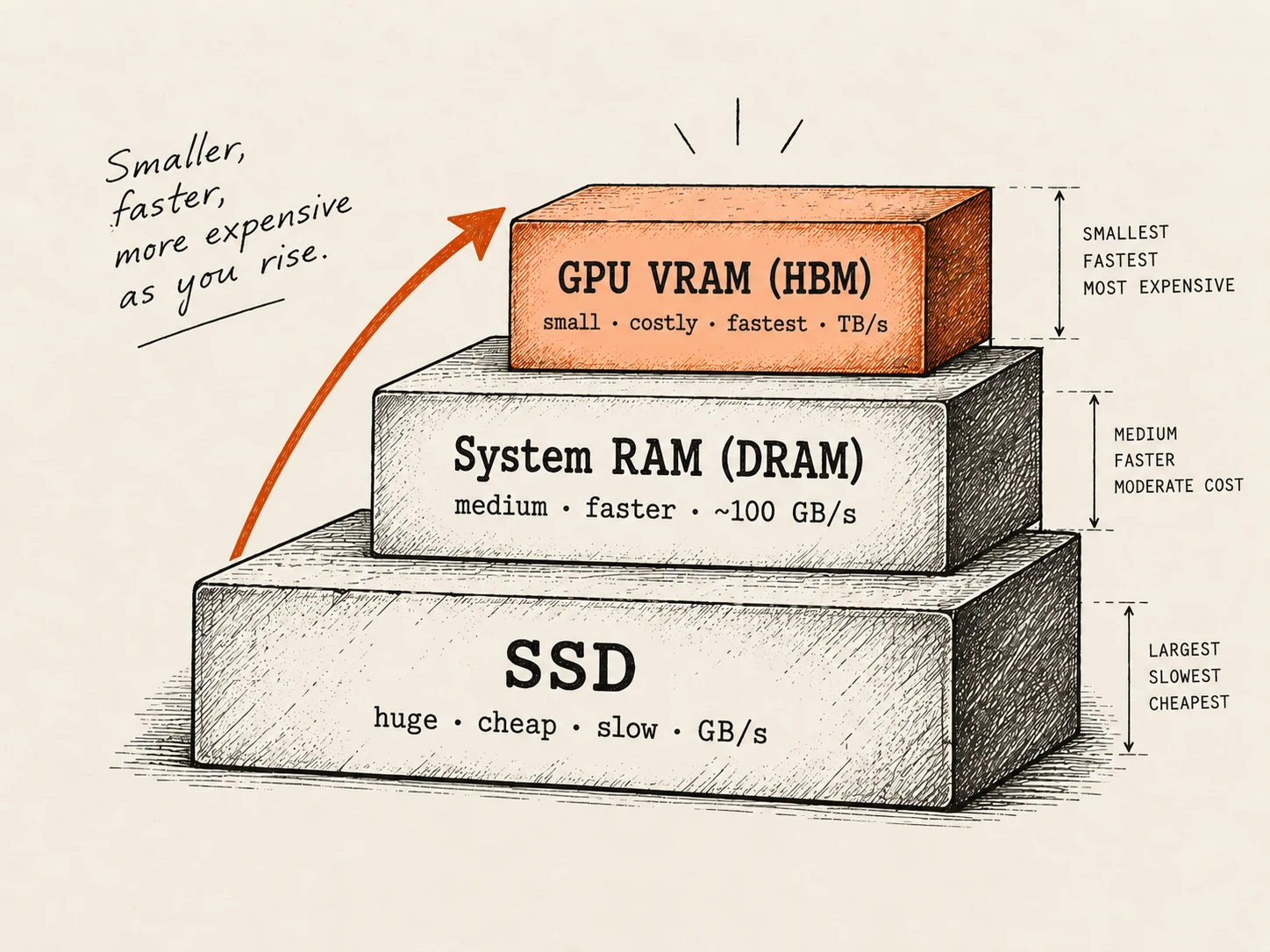
The model starts life at the bottom of this staircase (on the SSD) and needs to end up at the top (in VRAM), where the GPU can actually use it. The whole journey is: SSD → System RAM → VRAM.
The question is how it makes that climb — because there’s a slow way and a clever way.
The slow way: read everything, then copy it twice
The obvious approach is to do exactly what the words suggest:
- Open the file on the SSD and read all of it into system RAM.
- Once it’s in RAM, copy it across to the GPU’s VRAM.
- Now the GPU can use it.
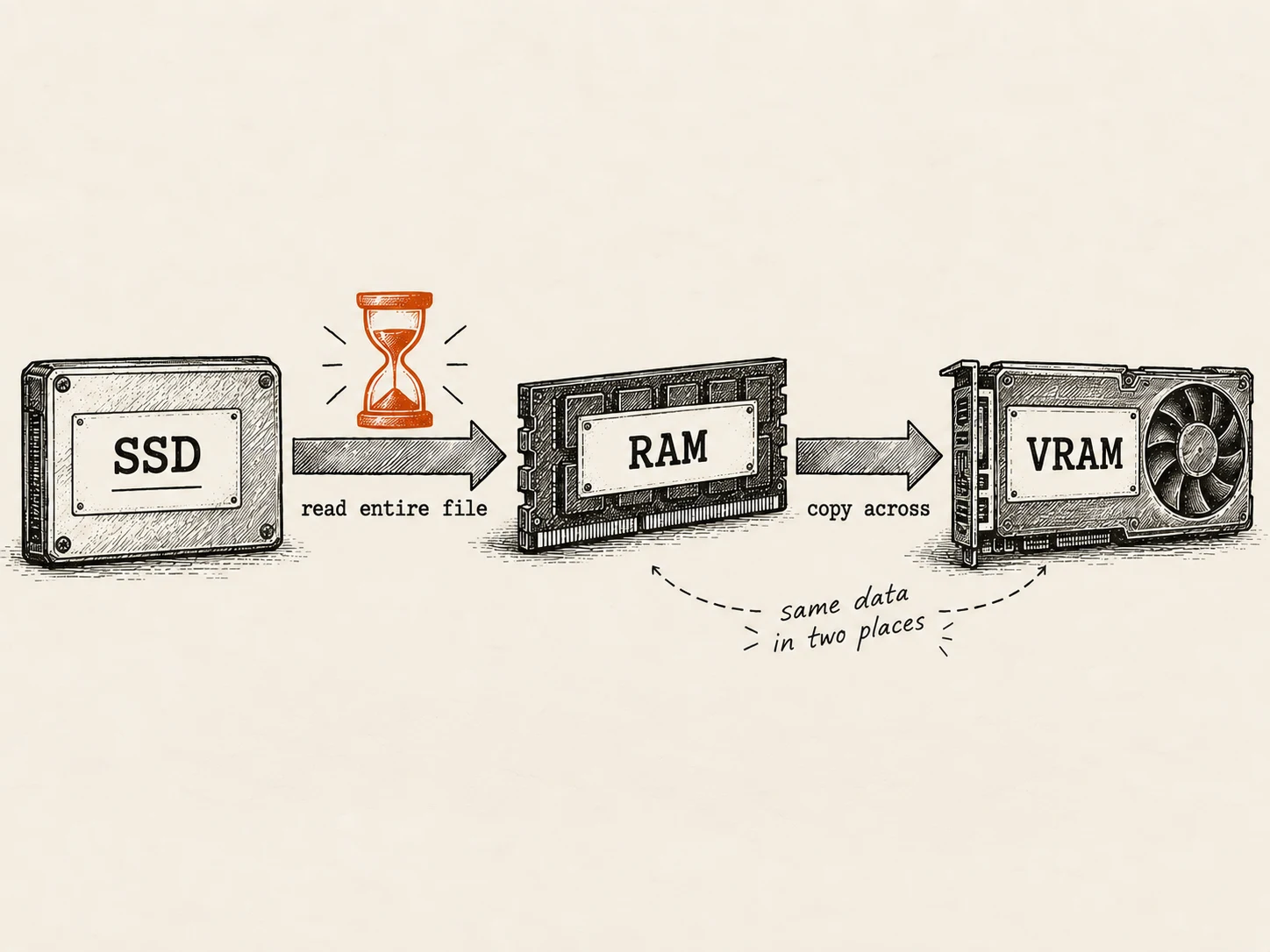
This works, and for the GPU it’s essentially unavoidable for the final step (more on that in a moment). But done naively, it has two problems. It’s slow, because you wait for the entire multi-gigabyte file to be read before anything is usable. And it’s wasteful, because for a moment the data exists twice — once in the disk’s file cache and once in your allocated RAM — so a 20 GB model can need closer to 40 GB of memory to load this way.
For loading into system RAM, there’s a much better approach.
The clever way: memory mapping (mmap)
Modern loaders lean on a trick provided by the operating system called memory mapping, usually shortened to mmap.
Instead of reading the file and copying its contents into RAM, mmap does something subtler: it tells the operating system, “treat this file on disk as if it were already sitting in memory.” The program instantly gets what looks like a full in-memory copy of the model — but nothing has actually been read yet. No upfront copy happens at all.
The bytes are only pulled in from the disk on demand, in small chunks (called pages), at the exact moment the program actually touches them. If a tensor is never used, its data is never read.
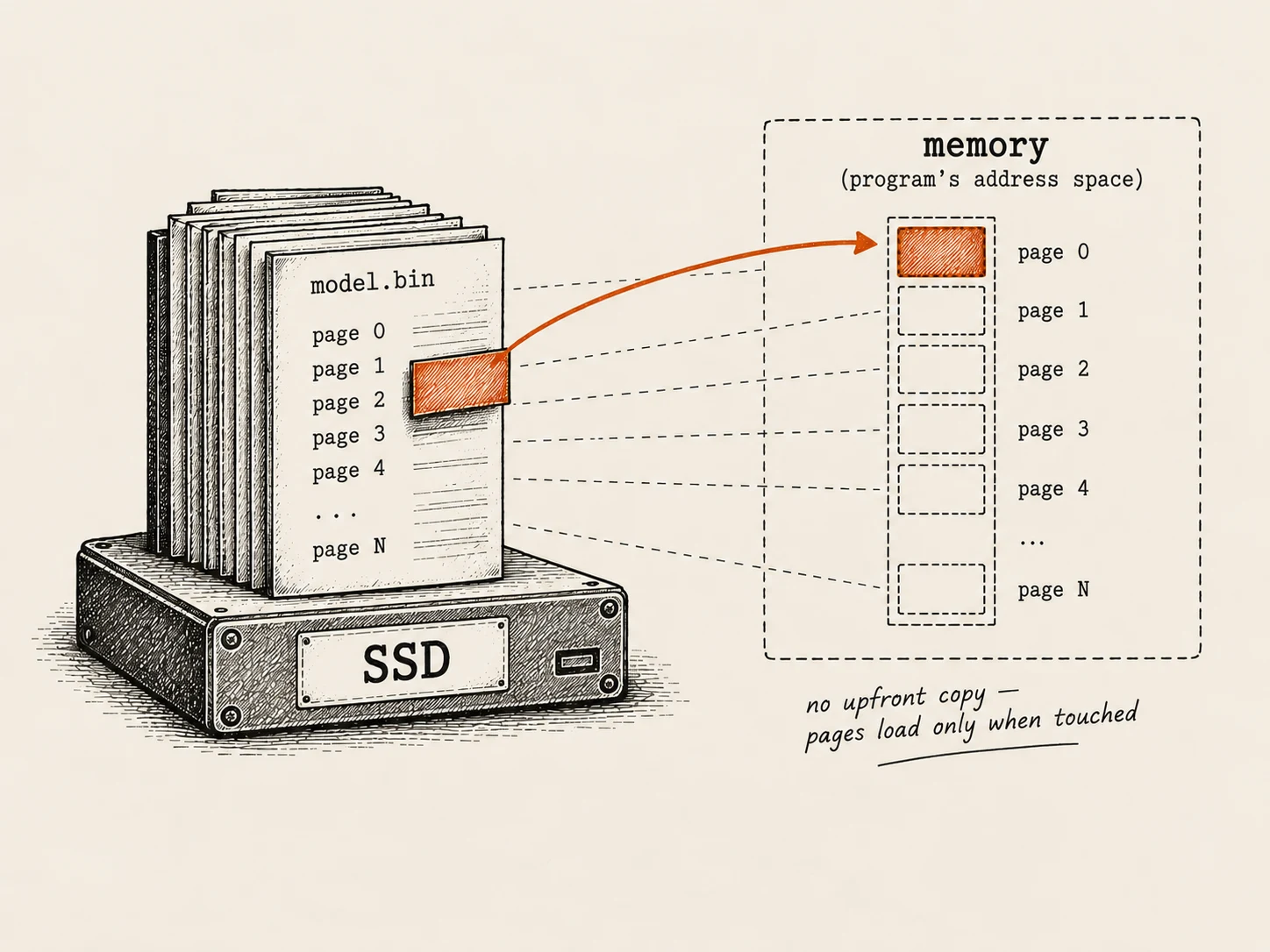
This is exactly where a detail from the last post pays off. Remember that both safetensors and GGUF record every tensor’s byte offset — precisely where its data begins in the file. That’s what makes mmap work so cleanly: the loader knows the exact location of every tensor, so it can map the file and jump straight to any tensor’s bytes without scanning or reshuffling anything.
Why the second load feels instant
Memory mapping has a second benefit that explains the puzzle from the top of this post.
When the operating system pulls pages in from disk, it keeps them in a region called the page cache. So the first time you load a model, the pages still have to come off the SSD. But every time after that, they’re already sitting in the page cache — and the model becomes available almost instantly, with no real disk reading at all.
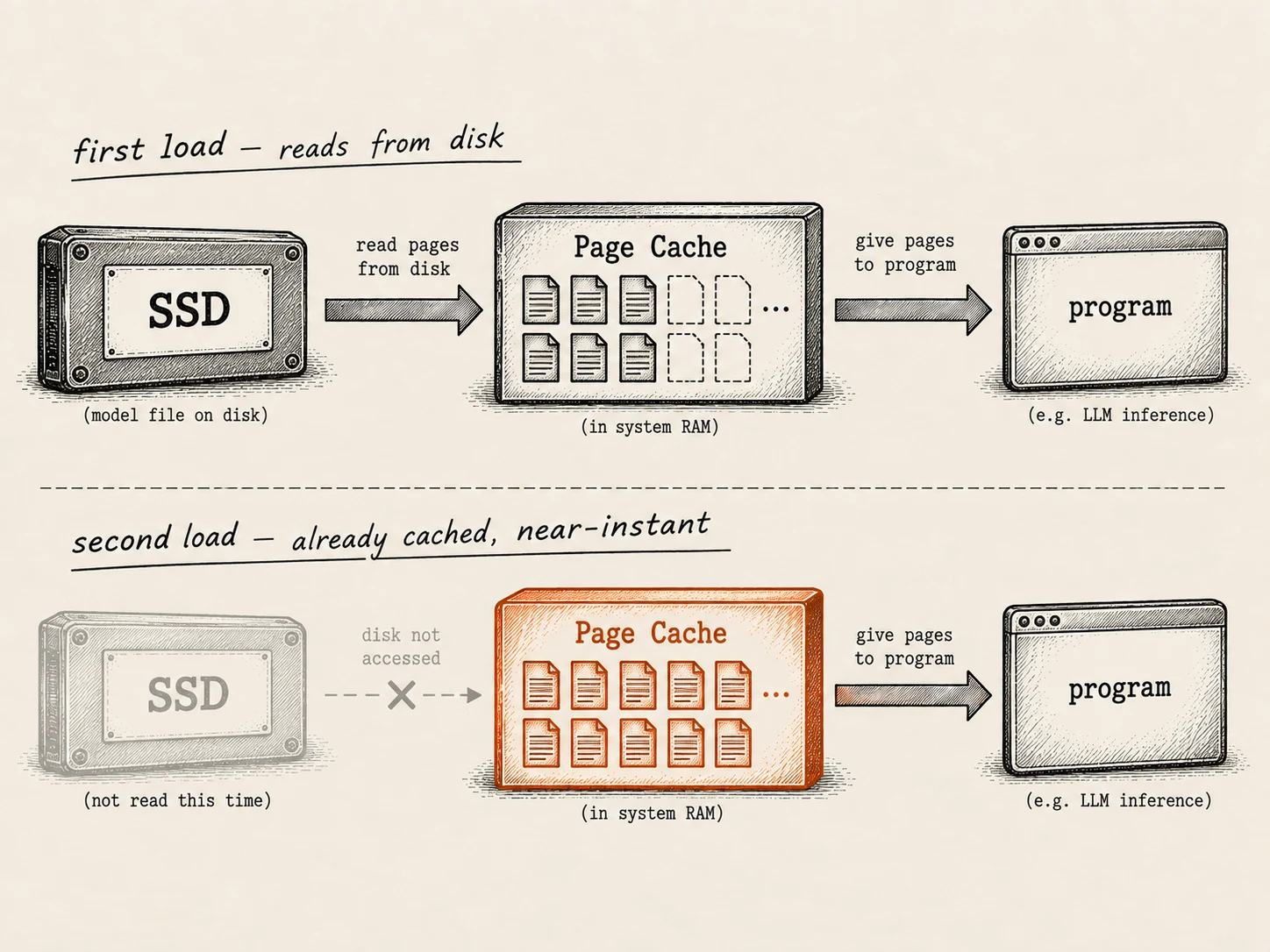
This is not a hypothetical. When memory mapping was added to the popular local-inference tool llama.cpp, load times dropped dramatically — startups that used to show a progress bar became effectively instant on repeat runs, because the weights were no longer being copied at all, just mapped and served from cache.
The honest catch: the GPU still needs a real copy
Here’s the part that a lot of explanations gloss over.
Memory mapping is a story about the CPU side of the journey — getting the file from the SSD into system RAM (or appearing to) without a costly copy. It’s fantastic for models that run on the CPU.
But the GPU has its own separate memory (VRAM), and it can’t magically map a file on your disk. To use the weights, the GPU needs them physically present in its own memory. That means a real copy has to happen across the connection between the CPU and GPU — a high-speed link called PCIe. There’s no way around it: the bytes must be moved into VRAM.
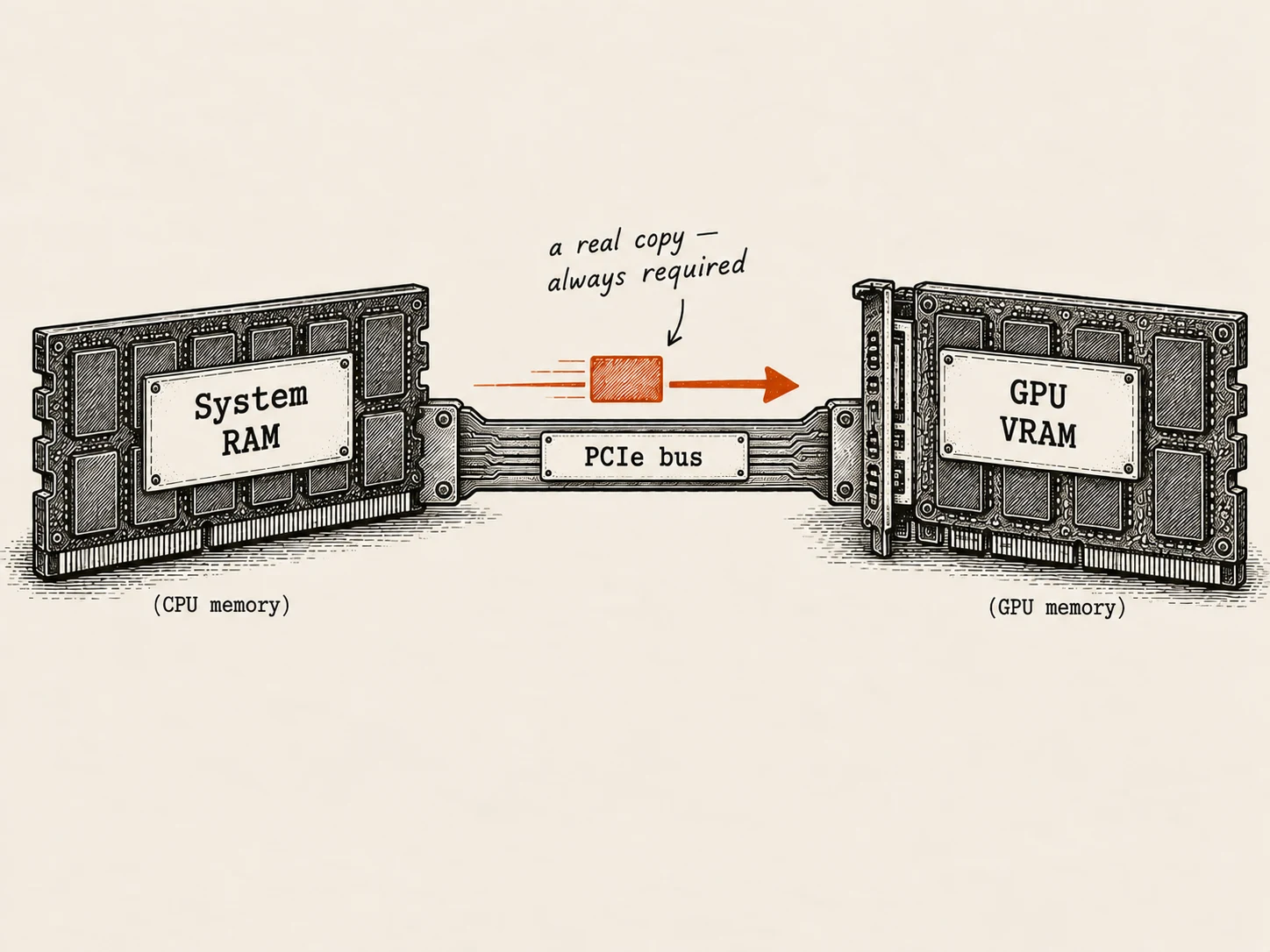
So the full picture is honest and simple:
- SSD → System RAM → mmap makes this nearly free, and instant on repeat loads.
- System RAM → VRAM → A real, unavoidable copy over PCIe — fast, but it costs real time, every time the model is loaded onto the GPU.
For a model running entirely on the CPU (like many local setups), mmap alone can make loading feel instantaneous. For a model running on the GPU, you always pay that one PCIe transfer to get the weights across.
So, puzzle solved
Why can a 14 GB model be ready in about a second? Because loading a model usually isn’t “read 14 GB off the disk and copy it into memory.” It’s:
- map the file instead of copying it (nearly free), and on repeat runs
- serve it straight from the page cache (no disk reading at all), and
- if a GPU is involved, pay a single fast copy across PCIe into VRAM.
The weights don’t so much get read as get pointed at — and only actually pulled in when needed.
TL;DR
- Data lives in three tiers: SSD (huge, slow, permanent), system RAM (medium, faster, temporary), and GPU VRAM (small, fastest, most expensive). The model must travel SSD → RAM → VRAM.
- The naive way reads the whole file into RAM, then copies it to VRAM — slow, and it briefly needs the data in two places at once.
- Memory mapping (mmap) avoids the upfront copy: the OS treats the file as if it’s already in memory and pulls in pieces (pages) only when they’re touched. This works cleanly because each tensor’s byte offset is known (from Post 3).
- The OS keeps loaded pages in a page cache, so the second load of a model is nearly instant — the puzzle from the top of the post.
- The catch: mmap only helps on the CPU side. Getting weights into the GPU always requires a real copy across the PCIe bus — fast, but unavoidable.
Enjoyed this? Subscribe on the homepage to catch the next post.
Loading comments…
0 comments